






TL;DR:
- Marketing automation workflows are sequences triggered by customer behavior or time to boost efficiency and revenue. Building these workflows requires clean data, clear goals, and integrated tools, with start-up focus on high-impact processes like inbound lead qualification. Coordinating multiple workflows and measuring revenue outcomes significantly amplifies results for SMBs.
Marketing automation workflows are sequences of automated marketing actions triggered by customer behavior or time, built to increase efficiency and revenue without adding headcount. Businesses using advanced workflows gain 14.5% higher sales productivity and reduce marketing overhead by 12.2%. That combination makes automation one of the highest-return investments an SMB can make. Platforms like HubSpot and ActiveCampaign have made these systems accessible to teams without dedicated engineers, and AI-powered orchestration is now pushing results even further. This guide walks you through what you need, which workflows to build first, and how to avoid the mistakes that kill most automation projects before they deliver.
What do marketing automation workflows actually require?
The biggest mistake SMBs make is buying a tool before defining a process. Workflow design is more critical than tool selection. Before you touch any platform, you need three things in place: clean data, clear goals, and the right stack.
Start with data hygiene
Normalized CRM fields are the foundation of every workflow that scales. If your contact records have inconsistent job titles, missing company names, or duplicate entries, your segmentation breaks and your triggers misfire. Audit your CRM first. Standardize field formats, remove duplicates, and confirm that every contact has the data points your workflows will use.
Choose tools that talk to each other
Modern workflows integrate 5 or more systems, including email platforms, CRM, product analytics, data warehouses, ad platforms, and AI decision agents. You do not need all of these on day one, but your core stack must be able to share data cleanly.
| Platform | Best For | Key Feature |
|---|---|---|
| HubSpot | All-in-one SMB automation | Native CRM plus email plus workflows |
| ActiveCampaign | Email and SMS automation | Advanced conditional logic |
| Klaviyo | E-commerce workflows | Deep Shopify and WooCommerce integration |
| Marketo | Mid-market lead management | Robust scoring and routing |
| Mailchimp | Entry-level automation | Simple journey builder for beginners |
Set measurable goals before you build. Are you automating lead qualification, improving trial onboarding, or recovering abandoned carts? Each goal requires a different trigger logic and a different success metric. Vague goals produce vague results.
Pro Tip: Connect your email marketing workflows to your CRM from the start. Retrofitting that integration later costs three times the effort.
Which workflows should smbs build first?
Not all automated marketing processes deliver equal returns. The five workflows below cover the highest-leverage use cases for SMBs, ranked by typical impact.
- Inbound lead qualification. A prospect fills out a form. The workflow captures the lead, enriches the record with firmographic data, scores it based on fit and behavior, routes it to the right sales rep, and logs the activity in your CRM. AI lead gen workflows that automate this entire sequence speed qualification and improve pipeline volume significantly. This is the workflow to build first.
- Lead nurture sequence. Triggered when a lead enters your funnel but is not yet sales-ready. A series of emails, spaced over days or weeks, delivers educational content matched to the lead’s stage. The goal is to move contacts from awareness to consideration without manual follow-up.
- Abandoned cart recovery. A shopper adds items but does not check out. The workflow sends a reminder email within one hour, followed by a second email at 24 hours. Adding SMS to this sequence improves recovery rates by 20–30%. That single channel addition can recover thousands of dollars in lost revenue monthly.
- Post-purchase follow-up. Triggered after a completed order. The workflow sends a thank-you, a usage tip, and a cross-sell recommendation at timed intervals. Post-purchase follow-ups can increase repeat purchases by 20–40%. Repeat buyers cost far less to convert than new ones.
- Re-engagement campaign. Triggered when a contact goes 60 or 90 days without opening an email or visiting your site. The workflow sends a targeted message with a strong offer or a direct question. Contacts who do not respond get suppressed, which keeps your list healthy and your deliverability high.
Using three or more coordinated workflows produces 2–3 times more monthly meetings than running a single workflow in isolation. The compounding effect of connected sequences is where the real gains appear.
Pro Tip: Start with inbound lead qualification. It sits at the highest-value moment in your funnel and delivers measurable pipeline results within the first 30 days.
How do you build a workflow step by step?
Building a workflow from scratch follows a repeatable process. Skipping steps is where most projects fail.
Step 1: Define your target segment. Who triggers this workflow? Be specific. “All leads” is not a segment. “Leads from paid search who visited the pricing page but did not request a demo” is a segment.
Step 2: Set the trigger. Triggers are the events that start the workflow. Common triggers include form submissions, page visits, email clicks, purchase completions, and inactivity periods. In HubSpot or ActiveCampaign, you set these as enrollment conditions.

Step 3: Map the message sequence. Write every email, SMS, or ad before you build. Define the timing between steps. Decide what happens when a contact clicks versus when they ignore the message. Branch logic at this stage prevents confusion later.
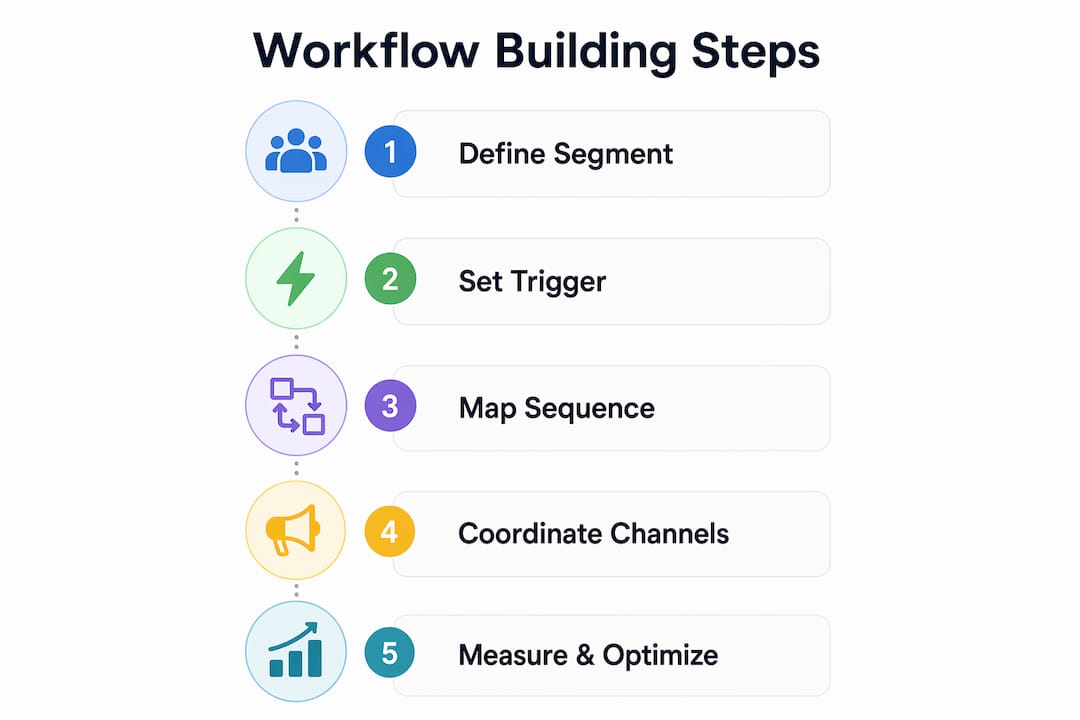
Step 4: Coordinate across channels. Real-time event-driven journeys trigger in milliseconds based on live customer signals. A contact who clicks an email link should immediately enter a different branch than one who ignores it. Platforms like Iterable and ActiveCampaign handle this branching natively.
Step 5: Test before you launch. Send test contacts through every branch. Check that CRM fields update correctly, that suppression rules fire, and that timing delays work as expected.
Common mistakes to avoid during design and execution:
- Building a 12-step workflow before a 3-step version has proven results
- Using the same message for every contact regardless of behavior
- Forgetting to set exit conditions, which traps contacts in loops
- Ignoring suppression rules, which causes contacts to receive irrelevant messages
- Measuring only open rates instead of conversion and revenue outcomes
Successful customer journey automation moves from static rules to dynamic, event-driven logic. Start simple. Measure. Then add complexity only where data justifies it.
Pro Tip: Run your first workflow for 30 days before adding branches or new steps. Clean data from a simple workflow teaches you more than a complex one that misfires.
What goes wrong with automation and how do you fix it?
Most workflow failures trace back to four root causes. Knowing them in advance saves months of troubleshooting.
Poor data quality. Workflows built on dirty CRM data produce misfires, wrong segments, and broken personalization. The fix is a data audit before launch and a monthly hygiene check after. Data hygiene is foundational to automation success, not optional.
Overcomplicated design. Teams that try to automate the full customer lifecycle in one build create workflows that are impossible to debug. The critical failure in automation projects is attempting full lifecycle automation prematurely. Build one high-leverage process, prove it works, then expand.
Siloed data. When your email platform does not talk to your CRM, and your CRM does not talk to your ad platform, coordinated workflows become impossible. Contacts receive duplicate messages, sales reps miss context, and reporting breaks. Solve this with native integrations or a middleware tool like Zapier or Make.
Measuring the wrong things. Open rates and click rates track activity, not outcomes. Success metrics should focus on conversion and revenue, not superficial email statistics. Set up revenue attribution from day one so you know which workflows actually drive pipeline.
Marketers who measure true business impact and allocate budget to winning workflow paths consistently outperform those who optimize for vanity metrics.
For real-time optimization, use journey orchestration tools that adjust paths based on live behavior. Platforms like Iterable and Amperity offer this capability. Pair that with a B2B digital marketing workflow that feeds clean data into every stage of the funnel.
Key takeaways
Marketing automation workflows deliver their highest returns when built on clean data, started with a single high-leverage process, and measured by revenue outcomes rather than activity metrics.
| Point | Details |
|---|---|
| Data hygiene comes first | Normalize CRM fields before building any workflow or triggers will misfire at scale. |
| Start with lead qualification | Inbound lead qualification delivers measurable pipeline results faster than any other workflow type. |
| Coordinate multiple workflows | Running three or more connected workflows produces 2–3x more meetings than isolated automations. |
| Measure revenue, not opens | Track conversion and revenue outcomes from day one to identify which workflows actually drive growth. |
| Add SMS to cart recovery | SMS added to abandoned cart sequences improves recovery rates by 20–30% with minimal extra effort. |
What working with smbs on automation has taught me
Most SMBs come to automation with the wrong question. They ask “which tool should we use?” The right question is “which single process is costing us the most revenue right now?”
Every time I have seen a workflow project stall, it is because the team tried to automate everything at once. They built a 15-step nurture sequence, a re-engagement campaign, and a trial onboarding flow simultaneously. None of them worked well because the data feeding them was inconsistent and the logic was untested. The teams that got results fast picked one bottleneck, usually the gap between a lead filling out a form and a sales rep following up, and automated that single handoff. Within 30 days they had proof. Within 90 days they had a system.
The other pattern I see consistently is teams celebrating open rates while their pipeline sits flat. Open rates tell you that your subject line worked. They tell you nothing about whether the workflow is generating revenue. Shift your reporting to pipeline created, demos booked, and deals closed. Those numbers tell you whether to scale a workflow or kill it.
Multi-workflow coordination is where the compounding gains live. A lead nurture sequence that feeds into a qualification workflow that triggers a sales alert creates a system. An isolated email sequence creates noise. Build toward the system, but start with one piece at a time.
— webspider
How Webspidersolutions can help you build smarter workflows
Webspidersolutions works with SMBs and marketing teams to design and execute digital marketing strategies that produce measurable results. If you are ready to move beyond one-off campaigns and build connected automated marketing processes, the right foundation starts with understanding the full digital marketing skill set required. Explore the digital marketing skills guide to identify where your team has gaps and where automation can fill them. You can also request a digital marketing audit to get a clear picture of which workflows and channels will drive the fastest returns for your specific business.
FAQ
What is a marketing automation workflow?
A marketing automation workflow is a sequence of automated actions triggered by a specific customer behavior or time condition, designed to move contacts through the funnel without manual effort. Common examples include lead nurture emails, abandoned cart reminders, and post-purchase follow-ups.
How do i know which workflow to build first?
Start with inbound lead qualification. It sits at the highest-value moment in your funnel and delivers measurable pipeline results within 30 days, making it the clearest proof of concept for any SMB automation program.
What tools do i need for email marketing workflows?
The minimum stack is a CRM and an email platform with conditional logic, such as HubSpot, ActiveCampaign, or Klaviyo. Adding SMS capability and a basic analytics connection significantly improves both reach and measurement accuracy.
Why are my automation workflows not converting?
The most common causes are poor data quality, overcomplicated workflow design, and measuring open rates instead of revenue outcomes. Audit your CRM data, simplify your workflow to three steps or fewer, and switch your success metric to pipeline or revenue generated.
How many workflows should an SMB run at once?
Running three or more coordinated workflows produces 2–3 times more monthly meetings than a single workflow. Start with one, prove it works, then add a second that connects to the first before building further.