







TL;DR:
- Effective content calendar planning involves structured workflows, clear ownership, and data-driven scheduling to ensure consistent high-quality output. Many failures stem from treating the calendar as a static plan rather than an operational system that tracks progress, ownership, and performance. Using the appropriate tools and maintaining flexibility with buffers and capacity maximizes efficiency and accountability.
Content calendar planning is the process of organizing, scheduling, and managing content production and publication across channels to deliver consistent, high-quality output that supports marketing goals. Without a structured editorial calendar, even well-resourced marketing teams publish inconsistently, miss campaign windows, and lose visibility into what is actually in production. Tools like Notion, Semrush, and Asana have made it easier to build a content strategy planner that functions as both a scheduling system and a workflow ledger. This guide walks you through every layer of that process, from the fields your calendar must capture to the approval workflows that prevent last-minute chaos.
What does an effective content calendar include?
A content calendar is only as useful as the fields it tracks. Semrush defines a social media calendar as a structured overview that clearly answers what, where, and when posts are published. That framing applies equally to blog content, email campaigns, and video production.
Every content calendar needs these core fields:
- Publication date and time — the scheduled go-live moment, not just the week
- Platform or channel — Instagram, LinkedIn, company blog, email newsletter
- Content type — short-form video, long-form article, infographic, carousel
- Topic and angle — the specific story or argument, not just a keyword
- Primary keyword or campaign tag — ties the piece to a broader SEO or campaign goal
- Content owner — the person responsible for delivery, not just the approver
- Approval status — draft, in review, approved, scheduled, published
For social media specifically, the calendar should also capture copy and call-to-action text, creative asset links, hashtag sets, campaign details, and a performance tracking column. That last field is what separates a planning document from a content marketing workflow that actually improves over time.
| Field | Purpose |
|---|---|
| Publication date and time | Prevents scheduling conflicts and missed windows |
| Platform and content type | Ensures format matches audience behavior on each channel |
| Content owner and status | Creates accountability and eliminates approval ambiguity |
| Primary keyword or campaign tag | Connects individual pieces to strategic goals |
| Performance tracking column | Enables data-driven decisions on future content mix |
The status field deserves special attention. Tracking end-to-end status from draft through published prevents the single most common calendar failure: nobody knows whether a piece is actually approved or just assumed to be. That ambiguity kills publish dates.
How to set up a content calendar workflow
Building the calendar is the easy part. Building the workflow around it is what determines whether your monthly content schedule holds up under real operational pressure.

Step 1: Audit your existing publishing cadence. Before adding anything new, document what you currently publish, on which channels, and at what frequency. This baseline reveals where you are over-committed and where gaps exist.
Step 2: Map campaigns and key dates. Load your annual marketing calendar first. Product launches, seasonal promotions, industry events, and awareness months all anchor your content marketing timeline. Everything else fills in around them.
Step 3: Set explicit status stages with named owners. Effective calendar management works at three planning horizons simultaneously: annual themes, quarterly content plans, and weekly execution. Each horizon needs a different meeting structure and a different level of detail.
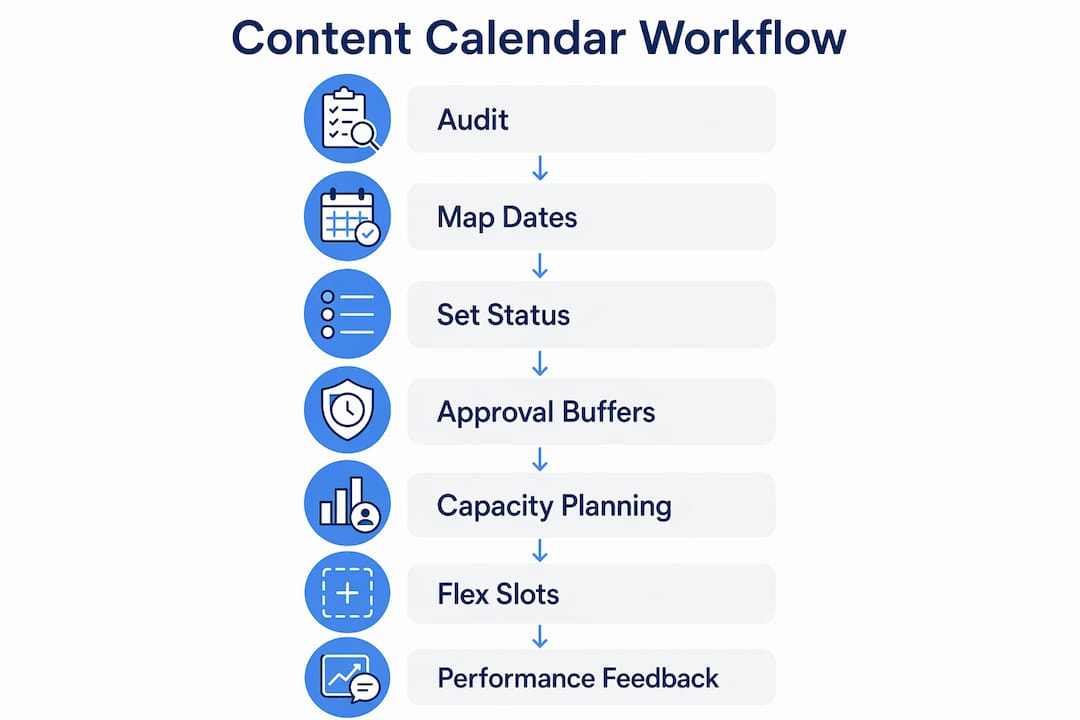
Step 4: Build in approval buffers. Kontentino recommends at least 48 to 72 hours for feedback rounds so review cycles do not push content past its publish date. This buffer is not optional. Without it, one delayed approval cascades into a missed week of publishing.
Step 5: Plan to 80% capacity. TeamBench advises planning around 80% capacity to leave room for revisions, reactive content, and quality review time. The remaining 20% is not wasted. It absorbs the surprises that every marketing team encounters: a breaking industry story, a client request, a piece that needs a full rewrite.
Step 6: Establish flex slots. Reserve two to three calendar slots per month with no pre-assigned topic. These slots exist for trend-responsive content or unplanned priorities. They keep your schedule agile without forcing you to drop planned pieces.
Step 7: Integrate performance feedback. After each publishing cycle, pull metrics into the calendar. Which pieces drove traffic? Which social posts generated the most engagement? That data feeds directly into your next quarterly planning session.
Pro Tip: Use your weekly content meeting exclusively for execution checks: what published, what is blocked, and which flex slots need filling. Save idea generation and strategic decisions for your quarterly planning session. Mixing the two in a single meeting wastes everyone’s time.
Quarterly planning translates annual themes into specific content titles, formats, and keywords for roughly 90 days ahead. The weekly calendar drives execution and issue resolution. Keeping those two functions separate is what makes the system scale.
What are the most common content calendar mistakes?
Most editorial calendars fail not because of poor planning but because of poor process design. These are the patterns that consistently undermine even well-intentioned content teams.
Treating the calendar as a static document. A calendar that nobody updates after the first week is just a wish list. The calendar must reflect reality: what was published, what was delayed, and what was cut. Kontentino’s approach treats the calendar as a workflow ledger with explicit status states and stage ownership, not a spreadsheet of intentions.
Publishing more than your team can review. Volume is not a strategy. If your review capacity supports eight pieces per month, planning twelve creates a quality problem, not a growth opportunity. Enforce quality gates before you expand output.
Planning too far ahead without flexibility. A calendar locked six months out with no flex slots cannot respond to algorithm changes, trending topics, or competitive moves. Leave room for reactive content every single month.
Skipping data validation before planning. Later’s Signal-to-Structure Framework helps teams plan 30 days of content in under one hour by starting with validated performance signals rather than brainstormed ideas. Planning from data rather than intuition produces a more defensible content mix and reduces the time spent debating topics in meetings.
“The biggest reason calendars fail is unclear approval workflow and status tracking. A system that explicitly records ownership, approval status, and schedule confirmation is critical.” — Kontentino’s Tereza Piteľová
Assigning vague ownership. “Marketing team” is not an owner. Every piece needs a named individual responsible for delivery. Without that, accountability disappears and deadlines slip. Your social media schedule should list a specific person next to every post, not a department.
Which tools work best for content calendar planning?
The right tool depends on your team size, workflow complexity, and budget. The market breaks into three categories: spreadsheets, project management platforms, and specialized content calendar tools.
Spreadsheets (Google Sheets, Microsoft Excel) work for solo operators and very small teams. They are free, flexible, and universally understood. The limitation is that they do not enforce workflow stages or send automated reminders, so discipline has to come from the team rather than the system.
Project management platforms like Notion, Asana, and monday.com add workflow automation, status tracking, and collaborative editing. Notion is particularly popular for content teams because it combines database views with document editing in a single workspace. Asana excels at dependency tracking, which matters when your content production involves multiple handoffs between writers, designers, and approvers.
Specialized content calendar tools like Semrush’s content marketing module and Later are built specifically for publishing workflows. Semrush integrates keyword research directly into the planning interface, which makes it easier to build a content strategy planner that stays aligned with SEO goals. Later focuses on social scheduling with performance analytics built in, making it the stronger choice for teams whose primary channel is social media.
| Tool | Best for | Key strength | Limitation |
|---|---|---|---|
| Google Sheets | Solo operators, small teams | Free, fully customizable | No workflow automation |
| Notion | Mid-size content teams | Database plus document editing | Setup requires investment |
| Asana | Teams with complex handoffs | Dependency and task tracking | Steeper learning curve |
| Semrush | SEO-driven content teams | Keyword integration in planning | Higher cost |
| Later | Social-first teams | Scheduling plus analytics | Limited for long-form content |
Pro Tip: Before selecting a tool, map your actual approval stages on paper first. Teams that choose a tool before defining their workflow end up bending the workflow to fit the tool, which creates friction. Define the process, then find the platform that supports it.
Canva is worth mentioning as a complement rather than a calendar tool. Many teams link Canva projects directly into their calendar rows as creative asset references, which keeps the production and scheduling views connected without requiring a separate asset management system. For a deeper comparison of content marketing platforms, the options vary significantly by team size and integration needs.
Key takeaways
Effective content calendar planning requires structured workflows, named ownership, and data-driven scheduling to maintain consistent output without sacrificing quality.
| Point | Details |
|---|---|
| Track status end-to-end | Record every stage from draft to published to prevent approval ambiguity and missed deadlines. |
| Plan to 80% capacity | Reserve 20% of your calendar for revisions, reactive content, and unexpected priorities. |
| Use three planning horizons | Annual themes, quarterly content plans, and weekly execution each require separate meetings and detail levels. |
| Build in approval buffers | Allow 48 to 72 hours for feedback rounds so review delays do not push content past publish dates. |
| Start planning with data | Use validated performance signals rather than brainstormed ideas to improve decision quality and planning speed. |
Why most content calendars are actually workflow problems in disguise
After working with marketing teams across industries, the pattern is consistent: the calendar itself is rarely the problem. The problem is that teams treat the calendar as a planning artifact rather than an operational system. They spend an afternoon building a beautiful spreadsheet, share it with the team, and then watch it become outdated within two weeks because nobody owns the update process.
The teams that get this right do one thing differently. They assign a calendar owner, not just content owners. That person is responsible for keeping status fields current, flagging blockers in weekly meetings, and pulling performance data back into the quarterly planning session. Without that role, the calendar drifts from reality and loses the team’s trust.
The 80% capacity rule from TeamBench sounds conservative until you watch a team that ignores it. When every slot is filled, there is no room to respond to a competitor announcement, a trending topic, or a piece that comes back from review needing a full rewrite. The teams that plan to 80% consistently publish more reliably than the teams that plan to 100%, because they are not constantly making triage decisions under deadline pressure.
The other thing worth saying plainly: weekly content meetings should be short and operational. Fifteen minutes to confirm what published, what is blocked, and what is filling the flex slots. The moment those meetings expand into strategy discussions, they stop serving their purpose. Strategy belongs in the quarterly session, where you have the time and the data to make good decisions.
How Webspidersolutions can support your content strategy
Webspidersolutions works with marketing teams and business owners to build content strategies that connect editorial planning directly to organic growth. If your content calendar is producing output but not driving measurable results, the gap is usually in the SEO layer. The SEO Strategy Guide: 14 Must-Do Steps from Webspidersolutions walks through exactly how to align your content planning with search demand so every piece you publish has a clear path to traffic. For teams managing multi-channel campaigns, the digital campaign management guide covers how to coordinate content calendars across paid and organic channels without losing strategic coherence.
FAQ
What is content calendar planning?
Content calendar planning is the process of scheduling, organizing, and managing content production and publication across channels to support consistent marketing output. It includes tracking publication dates, content owners, approval status, and performance metrics.
How far ahead should you plan a content calendar?
Most marketing teams benefit from three planning horizons: annual themes, quarterly content plans covering roughly 90 days, and weekly execution schedules. Quarterly planning provides strategic direction while weekly meetings handle execution and blockers.
What fields should every content calendar include?
Every calendar should capture publication date and time, platform, content type, topic, primary keyword or campaign tag, content owner, and approval status. Social media calendars also need copy, creative asset links, hashtags, and a performance tracking column.
Why do content calendars fail?
Calendars fail most often because of vague approval workflows and unclear ownership rather than missing dates. When nobody knows whether a piece is approved or just assumed to be, publish dates slip and the calendar loses credibility with the team.
How do you choose the right content calendar tool?
Match the tool to your workflow complexity. Google Sheets works for small teams with simple processes. Notion and Asana suit mid-size teams with multiple handoffs. Semrush fits SEO-driven teams that need keyword integration built into the planning interface.