






Managing growth in a SaaS company means facing tough questions about which marketing efforts truly drive results. Digital marketing managers need more than guesswork to navigate the complex ecosystem of acquisition, retention, and engagement. Mastering Google Analytics equips SaaS teams to turn raw activity into actionable insights, powering smarter decisions and measurable impact. With event-based tracking, cross-device measurement, and flexible attribution models, marketing leaders can finally connect user interactions to business growth, eliminating costly blind spots.
Table of Contents
- Google Analytics For SaaS: Essential Concepts
- Event-Based Tracking And Attribution Models
- Cross-Platform Measurement And User Journeys
- Optimizing Campaign Performance And Lead Generation
- Common Pitfalls And Alternatives Compared
Key Takeaways
| Point | Details |
|---|---|
| Master Google Analytics | Understanding and utilizing Google Analytics is essential for SaaS companies to track user behavior and optimize marketing strategies effectively. |
| Leverage Event-Based Tracking | Implementing event-based tracking offers unprecedented insights into user interactions, enhancing the measurement of user engagement. |
| Utilize Cross-Platform Measurement | Effective cross-platform tracking helps SaaS organizations gain a holistic view of user journeys across different devices and platforms. |
| Choose the Right Analytics Platform | Selecting an analytics platform should align with business objectives and compliance needs, considering factors like data privacy and user interface. |
Google Analytics for SaaS: Essential Concepts
Digital marketing managers seeking strategic insights into SaaS growth must master Google Analytics, a powerful web analytics platform designed to transform raw data into actionable business intelligence. By providing comprehensive tracking and reporting capabilities, Google Analytics enables SaaS companies to understand user behavior, optimize conversion paths, and drive sustainable revenue growth.
At its core, Google Analytics offers several critical features for SaaS organizations:
- Website Traffic Analysis: Tracks visitor sources, volumes, and engagement patterns
- User Behavior Mapping: Reveals how users navigate through your digital product
- Conversion Rate Tracking: Monitors critical conversion points in your marketing funnel
- Custom Event Tracking: Allows measurement of specific user interactions within your platform
Marketing professionals can leverage professional web analytics tools to gain deeper insights into audience segmentation and performance metrics. These tools help transform raw data into strategic decision-making frameworks that drive product improvements and marketing effectiveness.
Understanding key performance indicators (KPIs) is crucial for SaaS growth. Google Analytics provides robust reporting capabilities that enable marketing teams to:
- Identify high-performing acquisition channels
- Measure user engagement and retention rates
- Calculate customer lifetime value
- Optimize marketing spend across different platforms
Successful SaaS companies use Google Analytics not just as a reporting tool, but as a strategic intelligence platform that guides product development and marketing strategy.
Pro tip: Configure custom dashboards in Google Analytics to automatically track your most important SaaS growth metrics and save hours of manual reporting time.
Event-Based Tracking and Attribution Models
Event-based tracking represents a revolutionary approach in web analytics, fundamentally transforming how SaaS companies understand and measure user interactions. Unlike traditional session-based models, this method captures every digital touchpoint as a distinct event with rich, customizable parameters, providing unprecedented granularity in user journey analysis.
The core components of event-based tracking in Google Analytics include:
- Flexible Event Parameters: Capture detailed context about user interactions
- Cross-Platform Tracking: Monitor user behavior across web and mobile platforms
- Dynamic User Segmentation: Create sophisticated audience groups based on specific event sequences
- Comprehensive Interaction Mapping: Track granular user actions beyond simple page views
Attribution models in GA4 offer sophisticated methods for understanding marketing channel effectiveness. These models help SaaS marketers precisely attribute conversions, moving beyond simplistic last-click approaches to more nuanced multi-touch methodologies.

GA4 provides several powerful attribution models that enable deeper insights:
Here’s a quick overview of major GA4 attribution models and their best use cases:
| Attribution Model | Description | Best Use Case |
|---|---|---|
| Data-Driven | Uses machine learning to assign credit | Complex, multi-channel campaigns |
| Last Click | Attributes conversion to last touchpoint | Simple funnels, short sales cycles |
| First Click | Attributes conversion to first touchpoint | Brand awareness, early channel value |
| Linear | Equal credit to all touchpoints | Even contribution analysis |
| Time Decay | More credit to recent interactions | Long consideration periods |
- Data-Driven Attribution
- Last Click Attribution
- First Click Attribution
- Linear Attribution
- Time Decay Attribution
Modern SaaS marketing demands sophisticated tracking that goes beyond traditional metrics, providing a holistic view of user interactions and conversion pathways.
Pro tip: Configure custom event tracking to capture subtle user interactions that traditional analytics might miss, giving you a competitive intelligence advantage.
Cross-Platform Measurement and User Journeys
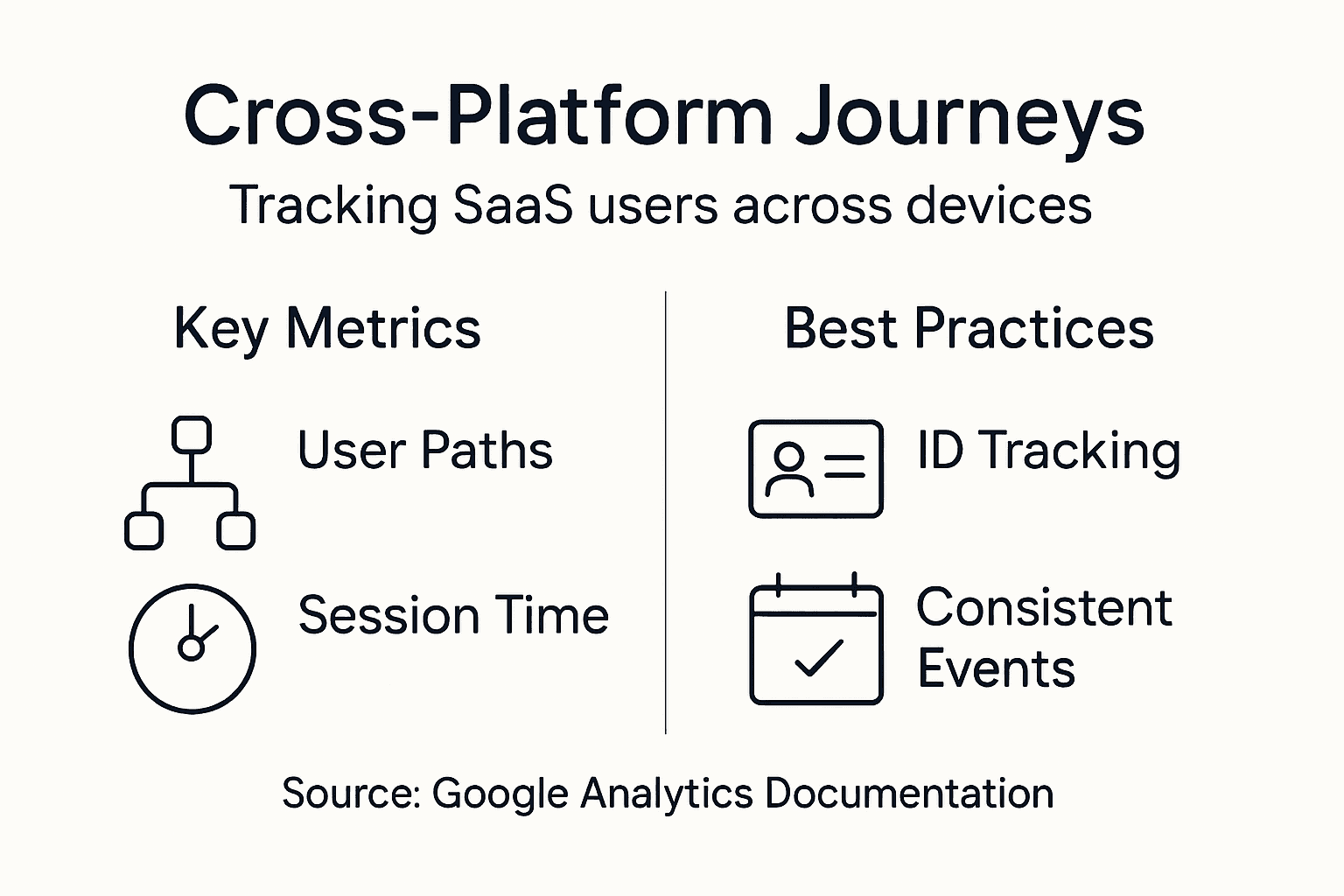
Cross-platform measurement has become a critical capability for SaaS companies seeking to understand complex user interactions in today’s multi-device digital ecosystem. Modern users seamlessly transition between smartphones, tablets, desktops, and other digital platforms, creating intricate journey maps that traditional analytics tools struggle to comprehend.
Key capabilities of cross-platform tracking enable SaaS organizations to gain unprecedented insights:
- Unified User Identification: Track individual users across multiple devices
- Comprehensive Journey Mapping: Understand complete user interaction sequences
- Device-Agnostic Reporting: Analyze behaviors regardless of access point
- Personalization Opportunities: Develop targeted experiences based on holistic user data
Cross-device reporting techniques provide sophisticated methods for connecting user interactions across different platforms. These advanced tracking mechanisms allow businesses to create a seamless, integrated view of customer engagement that transcends individual device boundaries.
The most effective cross-platform tracking strategies typically involve:
- Implementing consistent user ID tracking
- Utilizing event-based data collection
- Configuring advanced matching parameters
- Establishing unified conversion definitions
- Creating comprehensive multi-touch attribution models
Successful SaaS companies view user journeys as interconnected experiences, not isolated interactions across disconnected platforms.
Pro tip: Configure user ID tracking and implement consistent event naming conventions to ensure accurate cross-platform data integration and insights.
Optimizing Campaign Performance and Lead Generation
Campaign performance optimization represents a critical strategic imperative for SaaS companies seeking to maximize their digital marketing investments. By leveraging advanced analytics capabilities, organizations can transform raw marketing data into actionable insights that dramatically improve lead generation and conversion rates.
Key performance optimization strategies include:
- Granular Audience Segmentation: Target specific user groups with precision
- Dynamic Campaign Refinement: Continuously adjust marketing approaches based on real-time data
- Conversion Funnel Analysis: Identify and eliminate potential drop-off points
- Advanced Tracking Mechanisms: Monitor multi-touch conversion pathways
Campaign quality metrics provide a systematic framework for understanding marketing effectiveness. These metrics enable SaaS marketing teams to develop data-driven strategies that align advertising efforts with specific business objectives, ensuring more efficient resource allocation and improved lead generation outcomes.
The most effective campaign optimization approaches typically involve:
- Implementing comprehensive tracking systems
- Conducting regular performance audits
- Developing precise audience personas
- Creating targeted content strategies
- Utilizing advanced conversion tracking techniques
Successful digital marketing demands a continuous cycle of measurement, analysis, and strategic refinement.
Pro tip: Configure advanced conversion tracking and implement multi-touch attribution models to gain a holistic understanding of your marketing performance and lead generation ecosystem.
Common Pitfalls and Alternatives Compared
Analytics platform selection represents a critical decision for SaaS companies navigating the complex landscape of digital performance measurement. While Google Analytics remains a popular solution, numerous limitations and potential drawbacks can significantly impact data reliability and strategic insights.
Common challenges with traditional analytics platforms include:
- Data Sampling Limitations: Potential inaccuracies in large datasets
- Privacy Compliance Risks: Complex regulations and tracking restrictions
- Complex User Interfaces: Steep learning curves for non-technical teams
- Limited Raw Data Access: Restricted deep-dive analysis capabilities
Google Analytics drawbacks reveal critical considerations for SaaS businesses evaluating their analytics infrastructure. These insights help organizations make informed decisions about alternative platforms that better align with their specific tracking and reporting requirements.
Top alternative analytics platforms to consider include:
This table highlights leading analytics platforms and their unique strengths for SaaS businesses:
| Platform | Core Benefit | Ideal For |
|---|---|---|
| Google Analytics | Robust reporting, widespread use | Broad web and marketing analysis |
| Matomo | Data privacy, open-source control | Privacy-focused organizations |
| Mixpanel | Product usage, event analytics | Feature adoption, user engagement |
| Plausible | Lightweight, privacy-first approach | Simple site analytics with privacy |
| Piwik PRO | Enterprise solutions, compliance | Large firms with strict regulations |
| Fathom Analytics | Simple, GDPR-compliant reporting | Fast setup, regulatory needs |
- Matomo (Privacy-focused open-source platform)
- Fathom Analytics (Simplified, GDPR-compliant solution)
- Plausible Analytics (Lightweight, privacy-first tracking)
- Piwik PRO (Enterprise-grade analytics alternative)
- Mixpanel (Advanced product analytics)
Choosing the right analytics platform goes beyond features – it’s about finding a solution that matches your organization’s unique data strategy and compliance requirements.
Pro tip: Conduct a comprehensive audit of your current analytics setup, evaluating data privacy, reporting capabilities, and alignment with your specific business objectives before committing to any platform.
Elevate Your SaaS Growth with Expert Google Analytics Integration
Unlocking the full potential of Google Analytics is essential for SaaS companies striving to transform raw data into strategic insights. If you are focused on mastering event-based tracking, attribution models, and cross-platform measurement to optimize campaign performance and lead generation, you are addressing key growth challenges highlighted in the article. Tackling issues like detailed user behavior mapping and multi-touch attribution calls for sophisticated marketing strategies and data-driven decision making.
At Web Spider Solutions, we specialize in empowering businesses through tailored digital marketing services that strengthen analytics capabilities and maximize ROI. Whether you need advanced paid advertising solutions, precise audience segmentation, or seamless integration of analytics into your marketing campaigns, our team provides end-to-end support designed to boost your SaaS metrics. Start transforming your data into actionable growth now through our holistic approach available at Web Spider Solutions. Explore our insights on optimizing paid campaigns in Paid Advertising Archives – Web Spider Solutions and discover how artificial intelligence can enhance your analytics in Artificial Intelligence Archives – Web Spider Solutions.
Ready to turn your Google Analytics data into growth that matters Start with a free consultation today and see how our digital marketing expertise can deliver measurable SaaS success.
Frequently Asked Questions
What is Google Analytics and why is it important for SaaS companies?
Google Analytics is a powerful web analytics platform that helps SaaS companies track user behavior, analyze website traffic, and optimize marketing strategies to drive growth. It provides insights into user engagement, conversion rates, and performance metrics that are critical for business success.
How can I implement event-based tracking in Google Analytics for my SaaS product?
To implement event-based tracking, you can configure custom event parameters in Google Analytics to capture specific user interactions within your platform. This allows for a detailed analysis of user journeys beyond standard page views and provides deeper insights into user behavior.
What are the key performance indicators (KPIs) I should monitor with Google Analytics for my SaaS business?
Key performance indicators for SaaS businesses include user engagement and retention rates, conversion rates at critical funnel points, customer lifetime value (CLV), and the performance of various acquisition channels. Monitoring these metrics helps in making informed decisions that support growth.
How does Google Analytics support cross-platform measurement for SaaS businesses?
Google Analytics supports cross-platform measurement by allowing you to track individual users across multiple devices. This capability provides a comprehensive view of user interactions and enables businesses to create targeted experiences based on complete user data.
Recommended